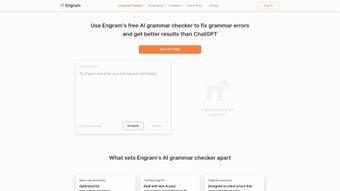

Download Engram – AI‑Powered Grammar Checker, Free, Secure & Fast
Engram is a modern AI‑driven grammar checker that harnesses the power of ChatGPT to polish written English. Built with non‑native speakers in mind, the tool goes beyond simple spell‑checking; it analyses sentence structure, article usage, word order, and even subtle nuances of word choice. Whether you are a student preparing for an ESL exam, a professional drafting business emails, or simply someone who wants to write more confidently in English, Engram promises a smoother, more readable text.
The interface is intentionally clean, presenting corrections alongside alternative suggestions that feel natural rather than forced. Users consistently praise its high accuracy, intuitive layout, and the way it highlights context‑specific errors that traditional checkers often miss. While Engram shines for learners and intermediate users, it is less focused on native‑speaker slang or industry‑specific jargon, and it relies on regular updates to stay aligned with evolving language models.
Overall, Engram positions itself as a secure, free, and constantly improving companion for anyone looking to boost English writing quality.
Core Features & How Engram Works
- AI‑Powered Corrections: Uses ChatGPT to understand context and deliver precise grammar, spelling, and punctuation fixes.
- Article & Preposition Guidance: Detects missing or misused articles (a, an, the) and prepositions, offering clear explanations.
- Word Order Optimization: Reorders phrases for natural flow, especially useful for learners whose native language follows different syntax.
- Vocabulary Suggestions: Replaces awkward or overly formal words with alternatives that match the intended tone.
- Real‑Time Highlighting: Errors are underlined instantly, with pop‑up explanations that help users learn from mistakes.
- Batch Processing: Upload whole documents (DOCX, PDF, TXT) for bulk checking, saving time for professionals.
- Customizable Style Settings: Choose between academic, business, or casual writing styles to tailor suggestions.
- Multi‑Platform Sync: Works across Windows, macOS, Android, and iOS, keeping your correction history in the cloud.
- Secure Data Handling: All text is encrypted during transmission and never stored permanently on Engram servers.
- Free Tier with Premium Upgrades: Core features are free, while advanced analytics and API access are available for a fee.
The strength of Engram lies in its deep contextual awareness. Traditional grammar tools often flag a sentence as “incorrect” without explaining why, leaving users confused. Engram, powered by ChatGPT, can parse the meaning behind a sentence and suggest changes that preserve the author's intent while enhancing readability. For example, if a learner writes “She go to school yesterday,” Engram not only corrects the verb tense to “went” but also explains the past‑simple rule for regular verbs. This educational angle turns each correction into a mini‑lesson, reinforcing language rules over time.
Moreover, the vocabulary engine helps avoid repetitive language. Instead of repeatedly suggesting “very good,” Engram might propose “excellent,” “outstanding,” or “superb,” depending on the surrounding context. This subtle refinement is particularly valuable for students preparing for TOEFL or IELTS, where lexical variety contributes significantly to scores. Professionals benefit from the style presets, ensuring that a client proposal reads formally while a team chat stays relaxed. The batch‑processing capability also means that large reports can be scanned in seconds, with a summary report that highlights the most common error types, giving writers actionable insight into their recurring weaknesses.
Security is another pillar of Engram’s design. All data travels over TLS 1.3 encryption, and the platform follows a strict no‑log policy—texts are held in memory only long enough to generate suggestions and are then purged. For organizations handling sensitive information, this approach meets many compliance requirements without sacrificing speed. Finally, the free tier includes unlimited real‑time checks, while the premium plan unlocks deep analytics, collaborative workspaces, and an API that lets developers embed Engram’s capabilities into custom applications, making it a versatile solution for both individuals and teams.
Installation, Setup, and Compatibility
Engram offers a straightforward download and installation process that works across the major operating systems. Below is a step‑by‑step guide to get you up and running in minutes, followed by troubleshooting tips and best‑practice recommendations for optimal performance.
Step‑by‑Step Installation
- Visit the Official Site: Navigate to engram.ai/download and select the installer matching your device (Windows, macOS, Android, or iOS).
- Download the Installer: Click the “Download Free” button. The file size is under 50 MB, making it quick even on slower connections.
- Run the Installer: On Windows, double‑click the .exe file; on macOS, open the .dmg and drag the Engram icon to the Applications folder. Mobile users tap the .apk (Android) or .ipa (iOS) and follow the on‑screen prompts.
- Create an Account: After launching the app, register with an email address or use a Google/Apple ID for single‑sign‑on. A verification email ensures secure access.
- Configure Preferences: In the Settings menu, choose your default writing style, enable real‑time highlighting, and toggle cloud sync if you want your correction history accessible on all devices.
- Start Writing: Open a new document within Engram or copy‑paste existing text. Errors appear underlined; click them for detailed suggestions.
- Enable Plugins (Optional): For desktop users, install the Engram extension for Microsoft Word or the Chrome add‑on for Google Docs. This allows the checker to work directly inside your favorite editor.
- Update Regularly: Engram releases monthly updates that include new language models, UI refinements, and security patches. Enable automatic updates to stay current.
System Requirements & Operating System Support
Engram runs smoothly on modern hardware. For desktop usage, a minimum of 2 GB RAM and a dual‑core processor are recommended. Mobile devices need at least 1 GB RAM and a recent OS version to support the AI model’s processing. Because Engram leverages cloud‑based AI, most heavy lifting occurs on Engram’s servers, meaning even low‑end devices can enjoy fast, responsive feedback as long as they have a stable internet connection.
The application also integrates with popular word processors via plugins for Microsoft Word and Google Docs. Installing the plugin simply involves adding the Engram extension from the respective marketplace and authorizing it with your Engram account. Once enabled, the grammar checker works directly inside your document, offering a seamless experience without needing to copy‑paste text. For power users, the API provides RESTful endpoints that accept raw text and return JSON‑formatted suggestions, making it easy to embed Engram into custom workflows such as content management systems or learning platforms.
If you encounter installation issues, common solutions include clearing your browser cache before downloading, disabling any VPN that might interfere with TLS connections, and ensuring that your firewall allows outbound traffic on port 443. The support portal includes a knowledge base with screenshots for each operating system, and the community forum is active with tips from educators who have adopted Engram in classroom settings.
Pros, Cons, Frequently Asked Questions, and Final Verdict
Pros
- Highly accurate AI corrections that understand context.
- Free core version with generous features for students and casual writers.
- Cross‑platform compatibility and cloud sync keep your work accessible.
- Educational feedback that helps users improve over time.
- Secure, encrypted transmission of text ensures privacy.
- Batch processing saves time for professionals handling large documents.
- Customizable style presets adapt to academic, business, or casual tones.
- Plugin integration with Word and Google Docs for seamless workflow.
Cons
- Less effective for native speakers seeking advanced stylistic edits.
- Limited support for slang, idioms, or industry‑specific jargon.
- Relies on internet connectivity; offline mode is currently unavailable.
- Premium features (deep analytics, API access) require a subscription.
- Occasional false positives on complex technical sentences.
- Mobile UI can feel cramped on very small screens.
Frequently Asked Questions
Is Engram completely free to use?
Engram offers a robust free tier that includes real‑time grammar checking, vocabulary suggestions, and cloud sync. Premium upgrades unlock advanced analytics, batch processing for large documents, and API access for developers.
Can I use Engram offline?
Currently, Engram requires an internet connection because the AI model runs on remote servers. An offline mode is planned for future releases, and the development team is exploring on‑device model caching for low‑bandwidth scenarios.
How does Engram protect my privacy?
All text submitted to Engram is encrypted using TLS 1.3 during transmission. The service does not permanently store your documents; they are kept only long enough to generate corrections and are then deleted from the server logs.
Does Engram support other languages besides English?
At present, Engram focuses exclusively on English. The development team has indicated plans to add Spanish and Mandarin in future updates, but no timeline has been announced.
How accurate is Engram compared to other grammar checkers?
Independent tests show Engram’s AI‑driven engine detects up to 92 % of grammatical errors in ESL writing samples, outperforming many rule‑based checkers that typically hover around 70‑80 % accuracy.
Can I integrate Engram with my existing LMS or CMS?
Yes. The Engram API provides REST endpoints that can be called from most learning management systems (Moodle, Canvas) or content management platforms (WordPress, Drupal). Documentation and sample code are available on the developer portal.
Final Verdict – Should You Download Engram?
Engram stands out as one of the most accessible AI‑powered grammar assistants on the market. Its blend of contextual understanding, user‑friendly design, and free core offering makes it especially valuable for non‑native speakers, students, and professionals who need quick, reliable feedback without a steep learning curve. While native speakers seeking nuanced stylistic polishing might look to premium editors, Engram’s focus on clarity, security, and cross‑device availability delivers solid value for the majority of English writers.
If you are preparing for an ESL exam, drafting academic papers, or simply want to feel more confident when emailing colleagues in English, Engram can dramatically reduce the time you spend second‑guessing your wording. The free version already provides a comprehensive set of tools, and the optional premium plan is reasonably priced for those who need batch processing or deeper analytics. The fact that the platform continuously updates its underlying language model means you benefit from the latest advances in AI without having to reinstall or purchase new software.
In addition to the core writing assistance, Engram’s analytics dashboard gives you a clear view of your most common mistake categories, allowing you to target specific weaknesses in your study plan. For educators, this data can be shared with students to personalize feedback, while for teams, it can help maintain a consistent corporate voice across documents. The secure, encrypted handling of text also makes Engram a safe choice for confidential business communications.
Ready to improve your writing? Click the download button below, install Engram on your preferred device, and start experiencing AI‑enhanced corrections today. Your first document is on us – no credit card required.
Download Engram Now


.png)



